Call Goals: Build the Framework Your Calls Are Scored On
Pick the 4 to 10 call goals Backdrop listens for on every call, start from MEDDPICC, BANT, SPICED or SPIN if you like, set the order they're asked in, and read or reshape the rubric behind each one.
Your framework is the short list of things a call should prove. Each one is a call goal, shown as a letter: Budget is B, Champion is C, Next step is N. Backdrop listens for your letters on every call, shows how far each one has got while you talk, suggests what to ask next, and scores the same letters after the call.
You pick 4 to 10 letters from a catalog of 20, or start from MEDDPICC, BANT, SPICED or SPIN and adjust from there. The order you put them in is the order Backdrop asks in.
Your first call goals
Setting up Backdrop ends on Create your call goals, right after the sample call.
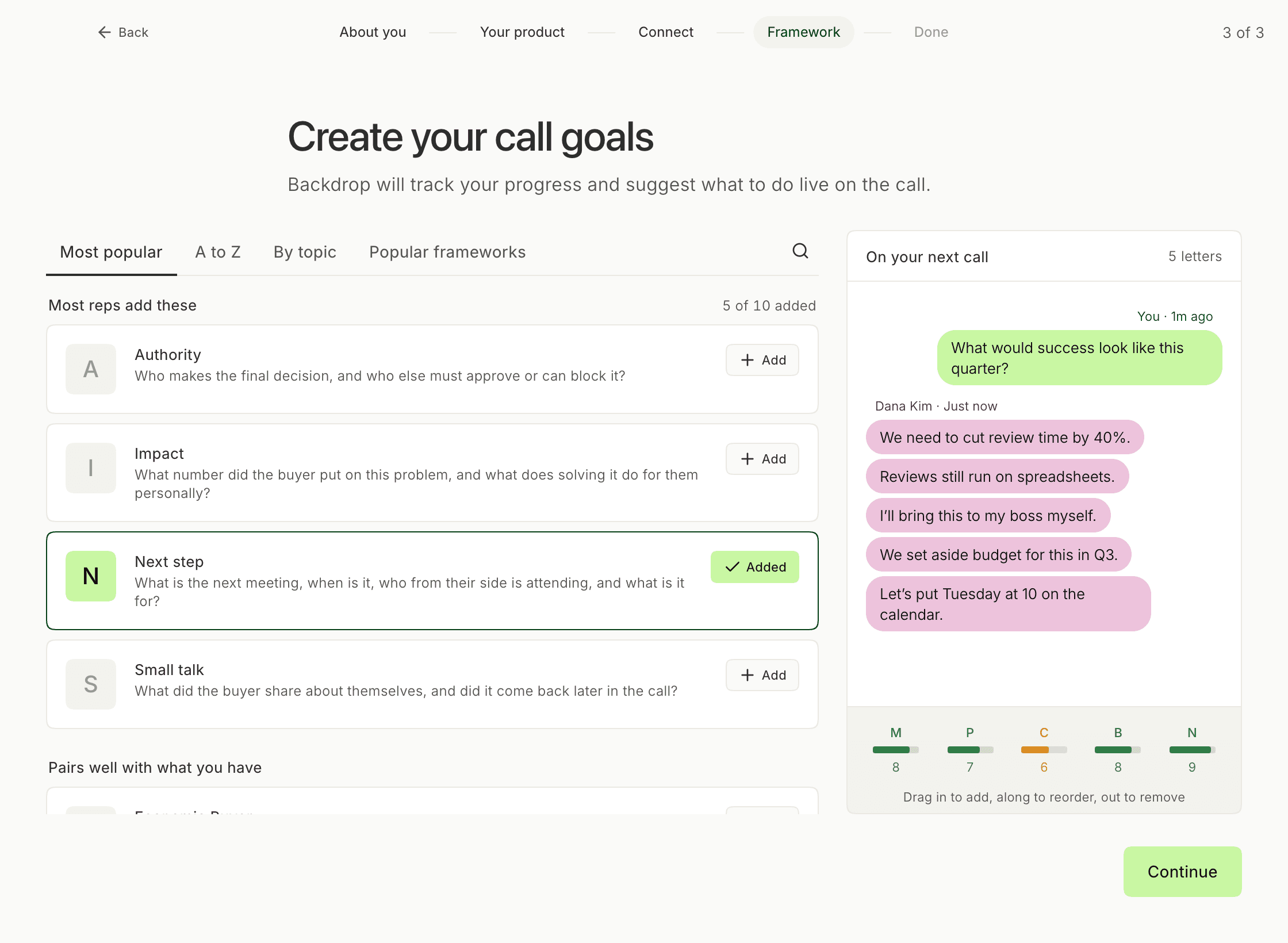
The page has two halves:
- On the left, every letter you can add, each with the question it answers on a call.
- On the right, On your next call plays a sample call with your letters: one line from the buyer for each letter, and a strip underneath with a cell per letter.
Click Add on a row to put that letter on the call. The count above the list keeps track, for example 5 of 10 added, and Continue turns on once you have four.
When you click Continue, Backdrop saves your letters as your framework, named for your company (for example Acme call goals), and scores your calls with it from the next one on.
Write a letter of your own
If your deals turn on something the catalog doesn't have, write the letter yourself during setup. Click the search icon, which opens a field reading Search, or write your own, and describe the goal in a few words: deal desk, who signs off on pricing, whether legal has seen our MSA. Once you've typed three characters, a card appears under the results.
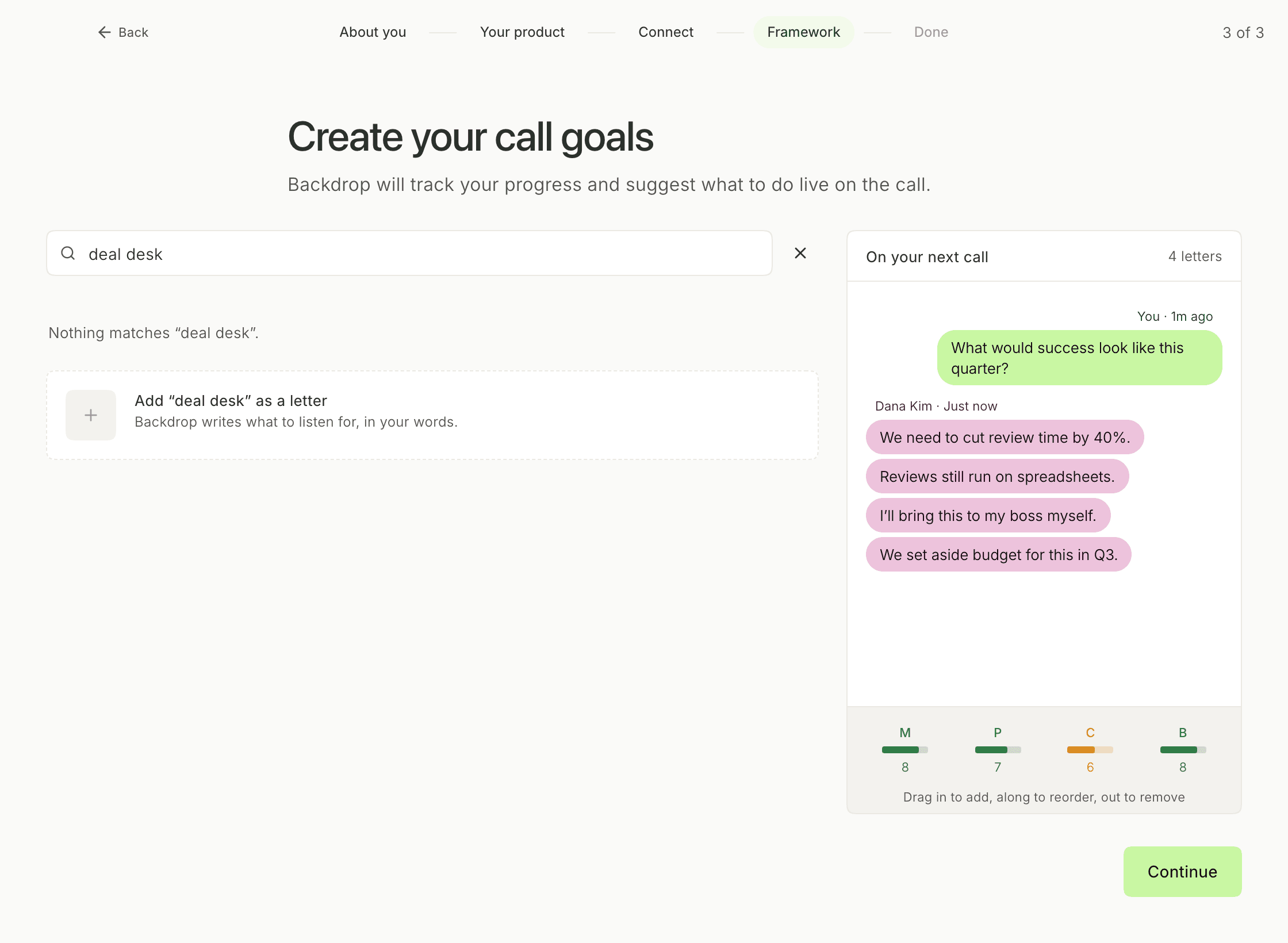
Click the card (Add “deal desk” as a letter in the example). It reads Writing it… for a second or two while Backdrop names the letter. Then the letter appears at the top of the list under Written for you, showing its letter, its name, and your words underneath.
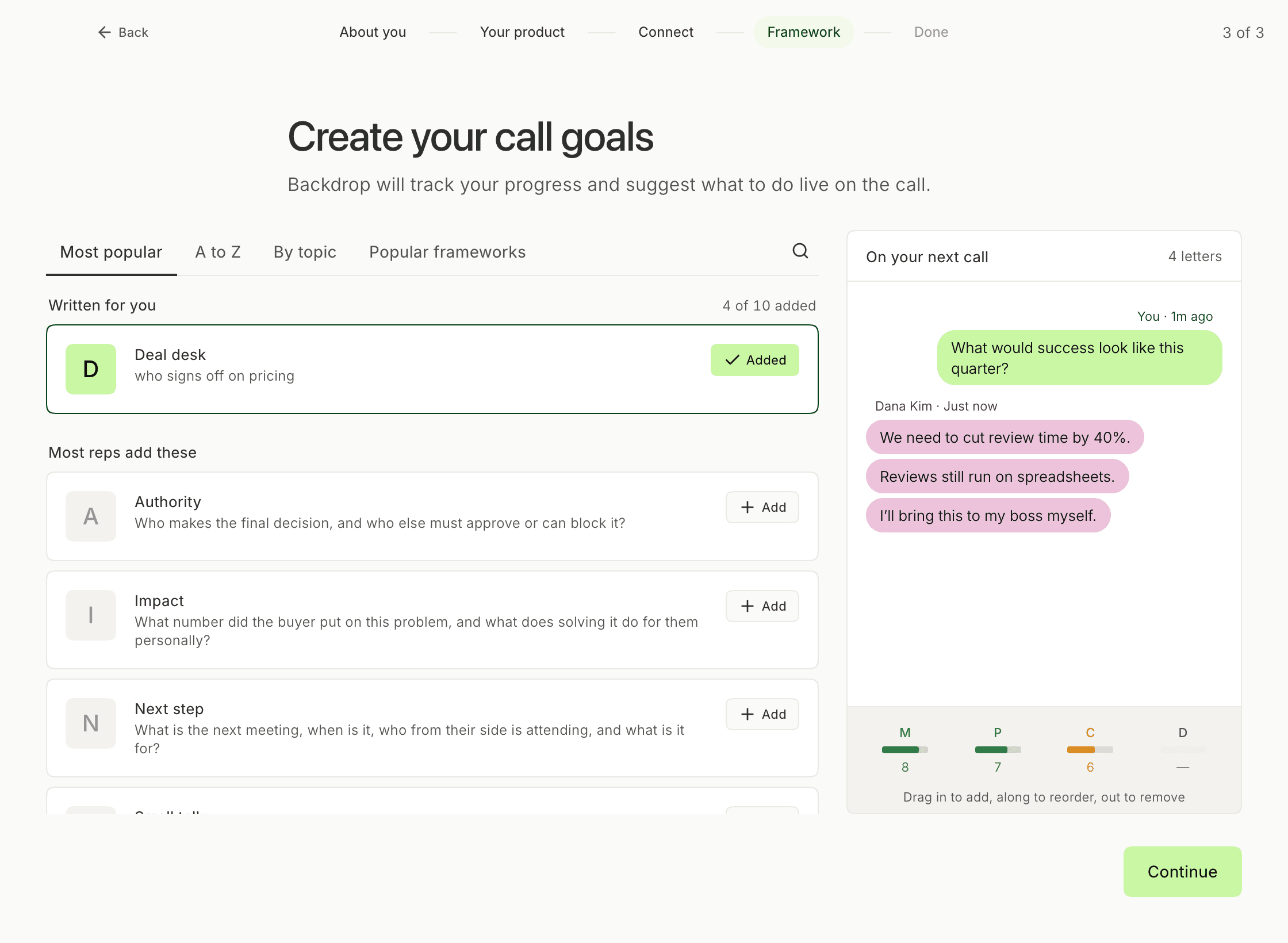
Your letter is scored once it's written
Backdrop writes the full rubric for a letter of your own after you click Continue, working from your company's knowledge base and the web. It takes about a minute. The letter joins your calls once it's written, and your other letters are scored as usual in the meantime.
Change your goals later
Click Frameworks in the sidebar. The list shows the built-in frameworks and the ones you've made, including the call goals from setup.
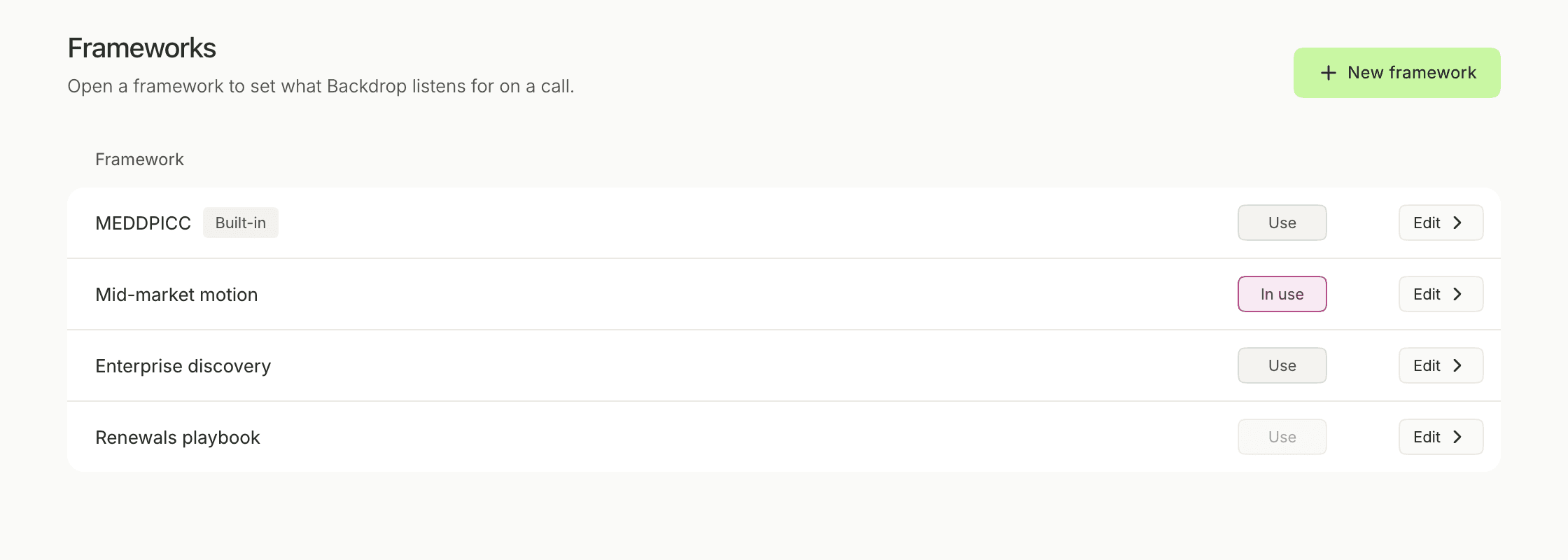
- In use marks the framework your calls are scored with. Click Use on another row to switch.
- Edit, or a click anywhere on the row, opens the framework's call goals.
- New framework opens an empty page titled New call goals. Add at least four letters and click Create framework. The new framework joins the list, and it starts scoring your calls once you click its Use.
Editing a built-in framework such as MEDDPICC, or one a teammate made, opens a copy that's yours to change. The original stays as it was.
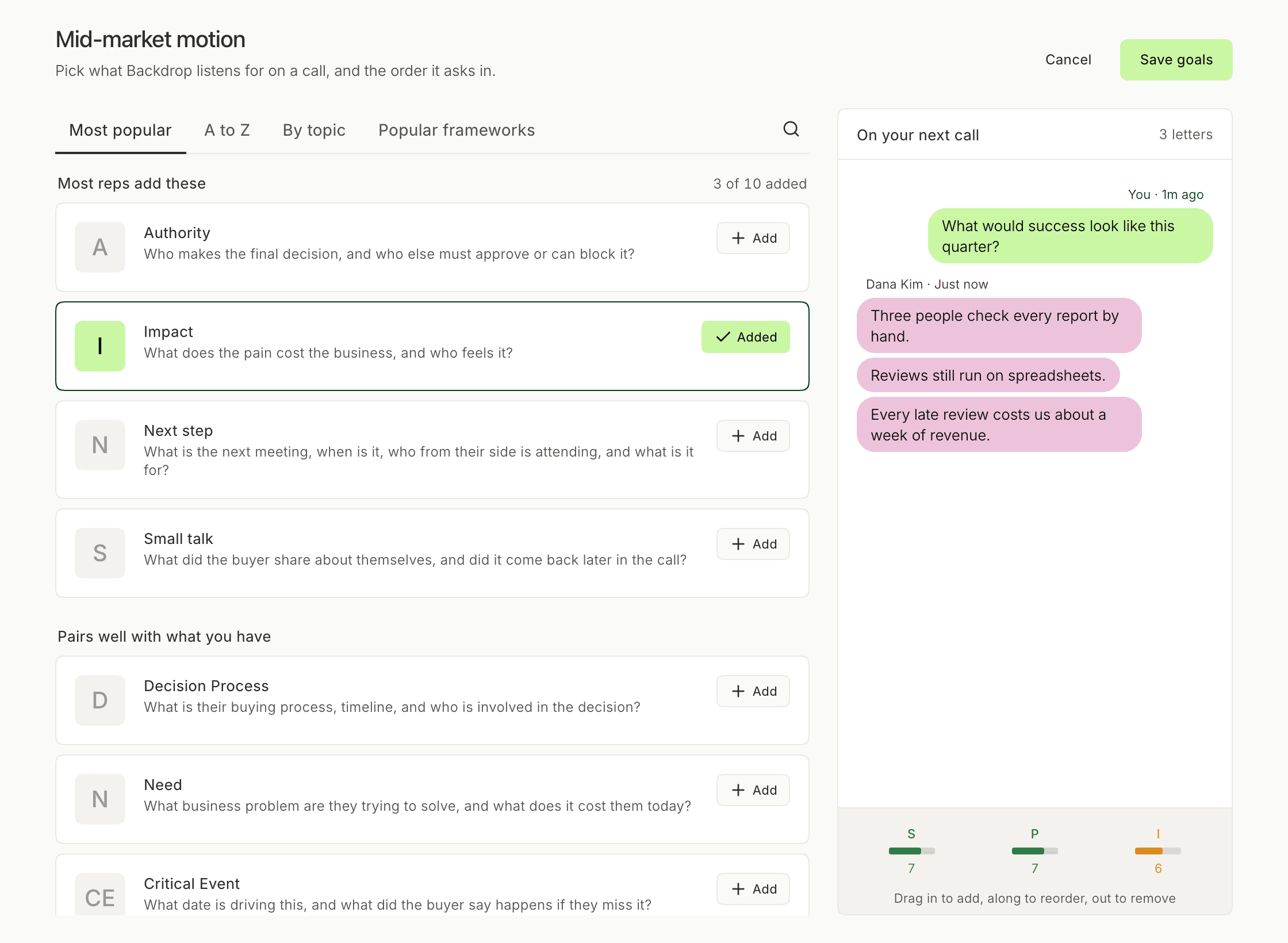
This is the same page you saw during setup, headed with the framework's name and with Save goals in the corner. Letters you add, remove or reorder take effect when you click Save goals, and Cancel leaves the framework as it was.
Find the right letters
Four tabs sort the same catalog:
- Most popular opens on Most reps add these (Authority, Impact, Next step and Small talk). Then comes Pairs well with what you have: letters from the same well-known frameworks as the ones you've added. Then Everything else.
- A to Z lists every letter by name.
- By topic groups them into Money and decisions, Their problem, Timing, People and rivals, and Technical fit.
- Popular frameworks holds the starting points in the next section.
To find a letter by name, click the search icon; Esc or the × closes the search. A call holds ten letters at most. At ten, the count reads That’s the most a call can hold, and Add stays off until you take one away.
Start from a known framework
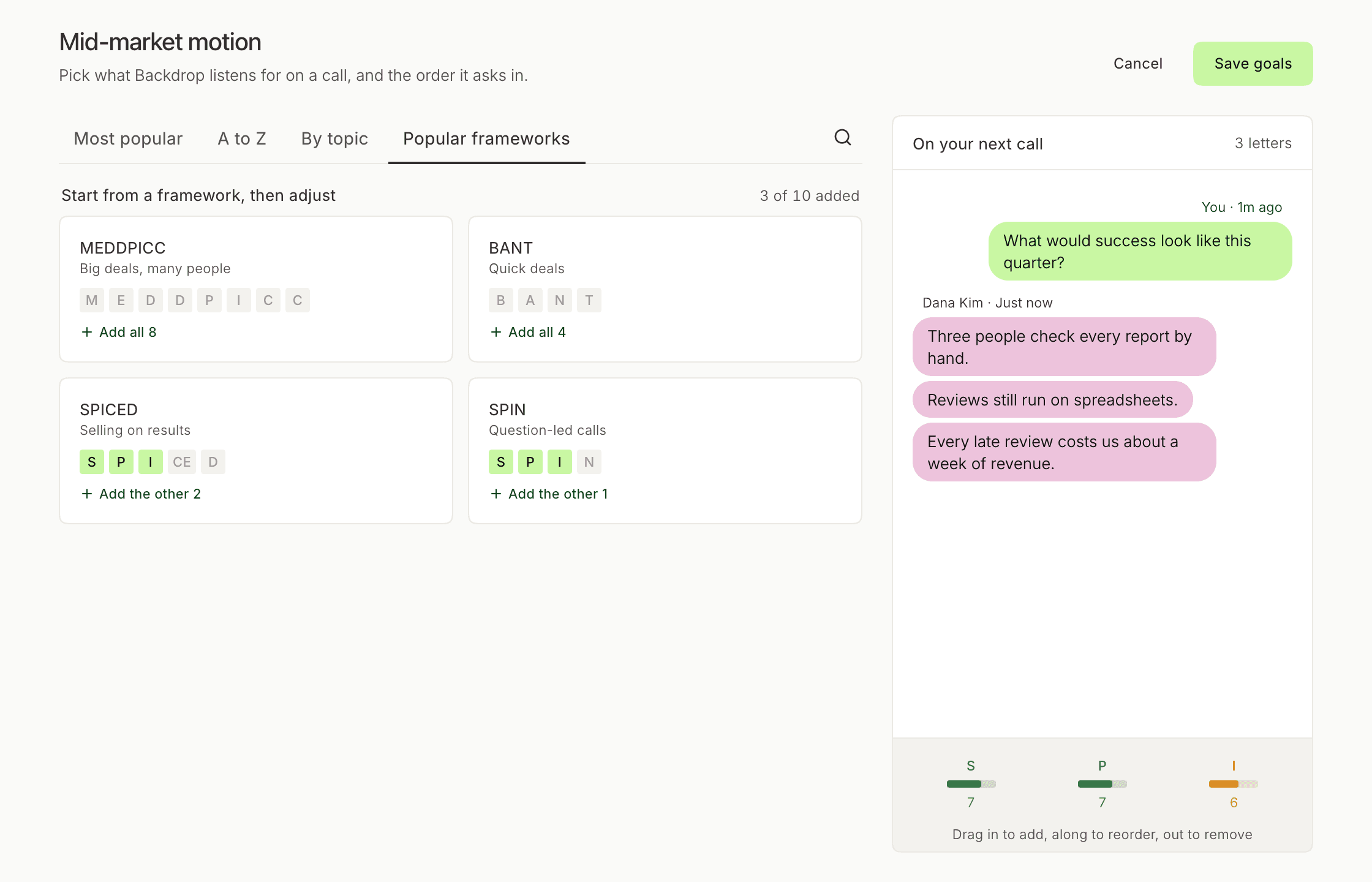
Popular frameworks offers four starting points:
| Framework | Built for | Letters |
|---|---|---|
| MEDDPICC | Big deals, many people | 8 |
| BANT | Quick deals | 4 |
| SPICED | Selling on results | 5 |
| SPIN | Question-led calls | 4 |
Each card lights up the letters you already have. Click it to Add all of them, or Add the other ones you're missing, then add, drop or reorder like any other letter. Clicking a card that reads Added takes its letters back off.
SPICED and SPIN add pain as Pain (P), and MEDDPICC adds it as Identify Pain (I). They're the same letter under two names, so your call only ever has one of them.
Set the order
The strip at the bottom of On your next call is your letters in the order they sit on the call, and the order Backdrop asks in. As its caption says: Drag in to add, along to reorder, out to remove.
- Drag a row from the list onto the call to add it where you drop it.
- Drag a cell along the strip to move it.
- Drag a cell off the call and let go to take it off.
Each cell shows the letter, a bar and a sample score out of 10: green from 7 up, amber from 4 to 6, red below 4. On a real call, the same strip fills in from what the buyer actually says.
Read a letter's rubric
When you're editing a framework, click any letter in the list to open it. The top of the window shows its short description and the question it answers on the call. Four tabs hold the rubric Backdrop scores it against:
- What it means: what the letter covers.
- How it scores: what each score out of 10 takes. Some letters add a Litmus test.
- Scored on: each thing the call has to establish, with three lines under it for when it's fully there (green), partly there (amber), and missing (red).
- Never counts: what never earns credit, however good it sounds on the call.
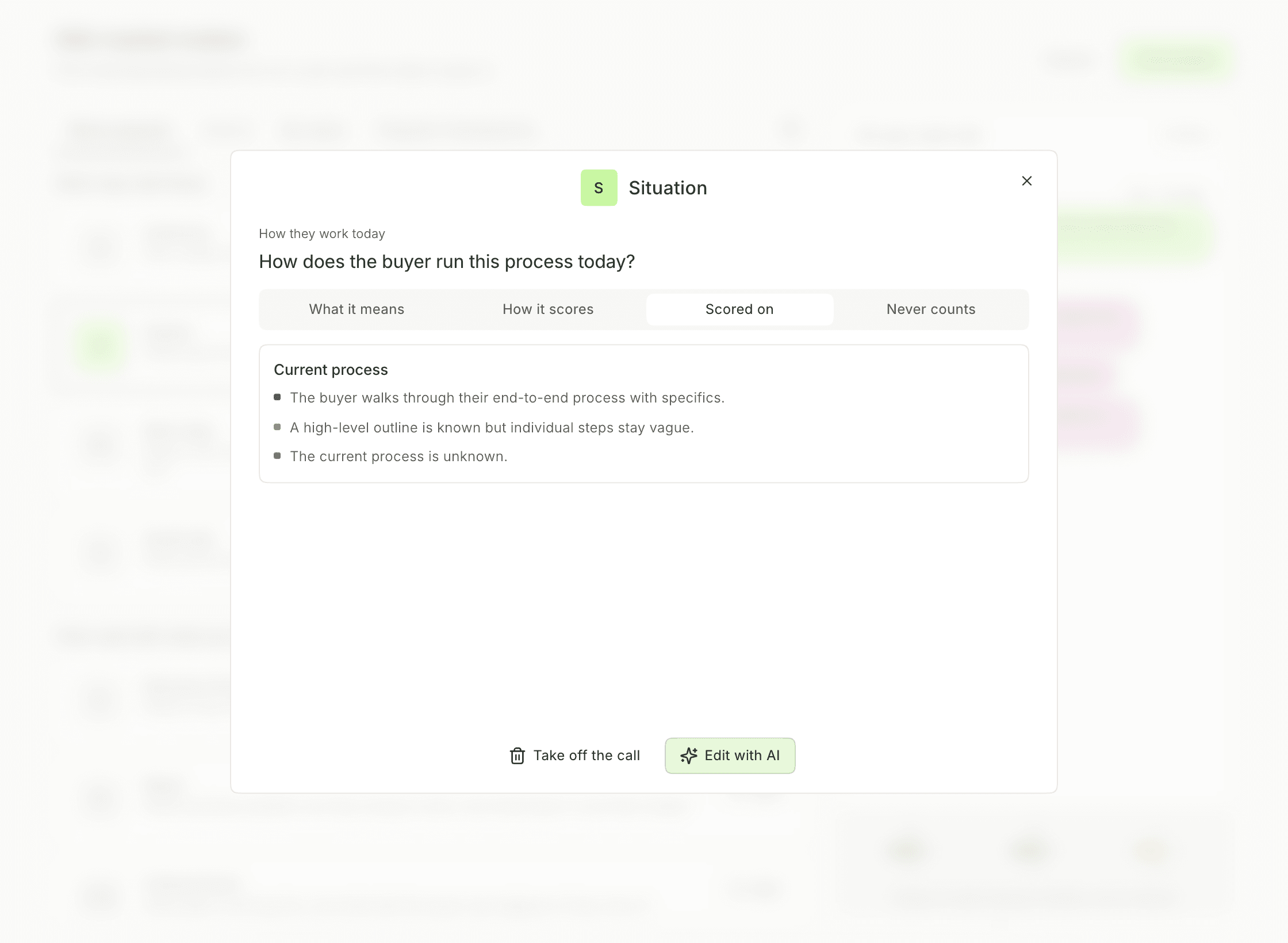
Take off the call removes the letter from your list. As with any other change on the page, it's saved when you click Save goals.
Change a letter with AI
For a letter that's on the call, click Edit with AI to rework it in plain words. Backdrop starts by listing what it can change:
- Rewrite the question it asks on the call
- Change how it scores, or what never counts
- Rename it, or change its letter
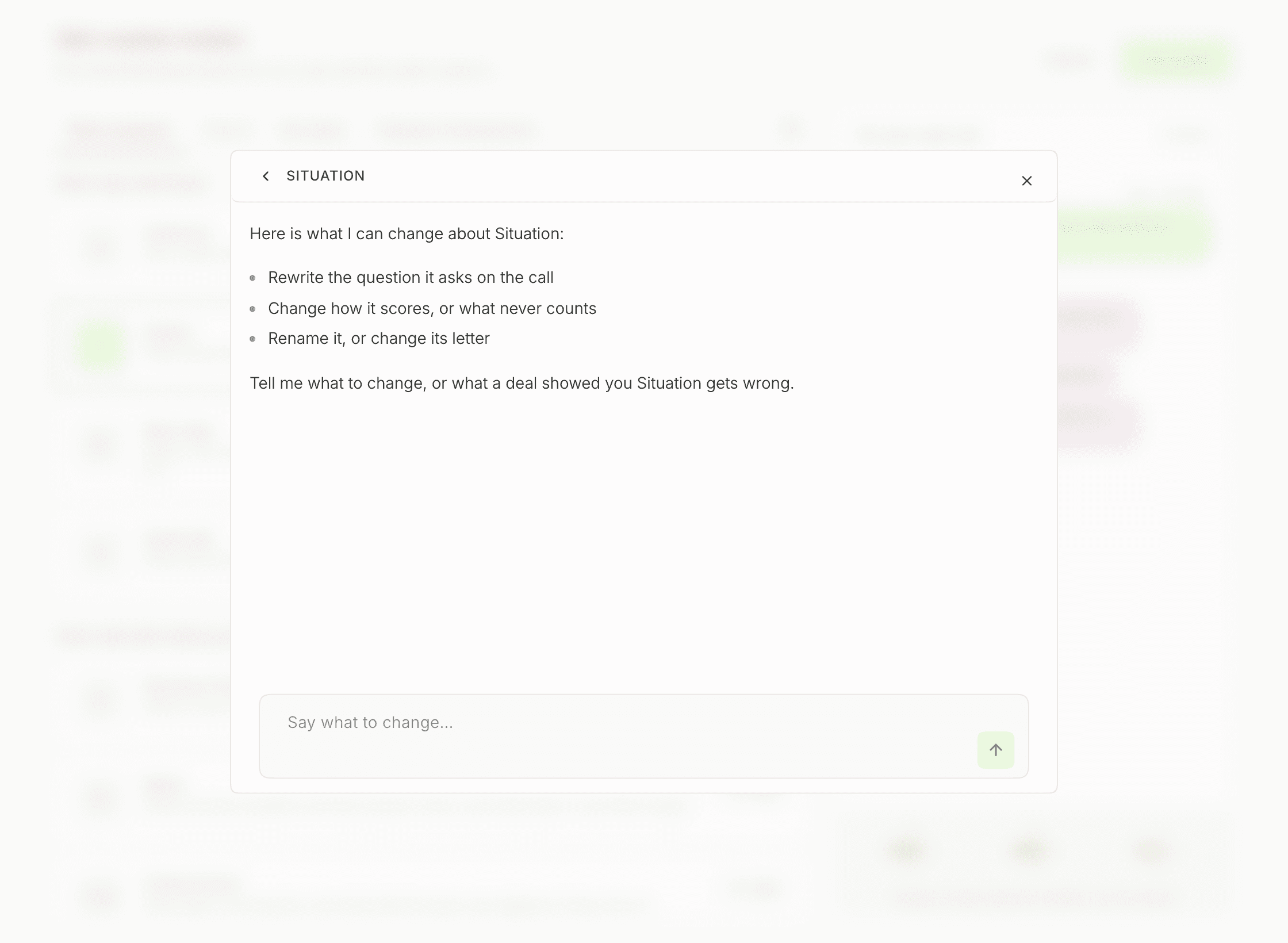
Type what's wrong in Say what to change…. It can be a rule (count it only when the buyer describes the process, not just names the tools) or something a deal taught you (we lost a deal that scored 8 here). Backdrop rewrites the letter, and the change is saved as soon as it's made, without waiting for Save goals. The arrow at the top left goes back to the rubric.
Edit with AI works on frameworks that already exist. On New call goals, click Create framework first, then open the framework again with Edit.
On the call and after it
On a call, the strip along the bottom of the Backdrop panel shows your letters in your order. Each one fills in as the buyer gives Backdrop something to go on. Hover a letter to see what's been captured, what's still missing, and a question to ask next. During a Call covers the panel.
After the call, the Qualification card on the call's page scores the same letters, each with its key question, what the call established, and what's still missing. See After a Call.
Admins set the org default
Organization admins see who each framework scores in an Assigned column, and can make one the default for everyone who hasn't picked their own with Set as org default in a row's right-click menu.
Every letter
| Topic | Letter | What it covers |
|---|---|---|
| Money and decisions | B Budget | Can they pay for it? |
| E Economic Buyer | Who controls the money | |
| A Authority | Who says yes | |
| D Decision Criteria | What they need to see to pick you | |
| D Decision Process | The steps to a yes | |
| P Paper Process | Legal and buying paperwork | |
| P Procurement | Is the buying process known? | |
| Their problem | M Metrics | How they'll measure success |
| P Pain | The problem they want fixed | |
| S Situation | How they work today | |
| N Need | What problem they need solved | |
| I Impact | What the problem costs them | |
| Timing | T Timeline | When they need it by |
| CE Critical Event | The date that forces a decision | |
| N Next step | Is the next meeting booked? | |
| People and rivals | C Champion | Who inside is on your side |
| C Competition | Who else they're looking at | |
| S Small talk | Did you find any common ground? | |
| Technical fit | S Security review | Has security or IT signed off? |
| I Integrations | Which tools must it connect to? |
Next step
During a Call shows where your letters sit on the live panel, under the transcript.
After a call
After every call, Backdrop writes a structured summary and a MEDDPICC qualification scorecard, and drafts a personalized follow-up email on demand. Nothing sends until you send it.
Languages
Every language Backdrop transcribes on a live call. Where the language control sits in the panel, how to switch it, and how to get a non-English language enabled for your workspace.